
MIDAS Live Demo: Explore Governed Autonomous Decisions
Explore how MIDAS evaluates whether an autonomous agent has authority to act, using a live sandbox environment with pre-built governance scenarios.
Try MIDAS: Live Authority Governance Demo
The MIDAS Explorer is a live sandbox environment running a real MIDAS instance. It lets you submit governance evaluation requests, inspect the outcome reasoning, and trace the authority chain that produced each decision — without writing code.
MIDAS is a runtime governance engine for autonomous systems. Its job is to answer a specific question at decision time: does this autonomous actor have the delegated authority to execute this decision, given its reported confidence and the consequence of being wrong? This is distinct from what rules engines and policy engines do. A policy engine like OPA asks whether an action is permitted by a defined policy. MIDAS asks whether a specific agent holds an active, valid grant of authority for the requested decision surface — and whether the thresholds in that grant are satisfied by the current request. The distinction matters when you are governing AI agents and automated systems that act on your behalf.
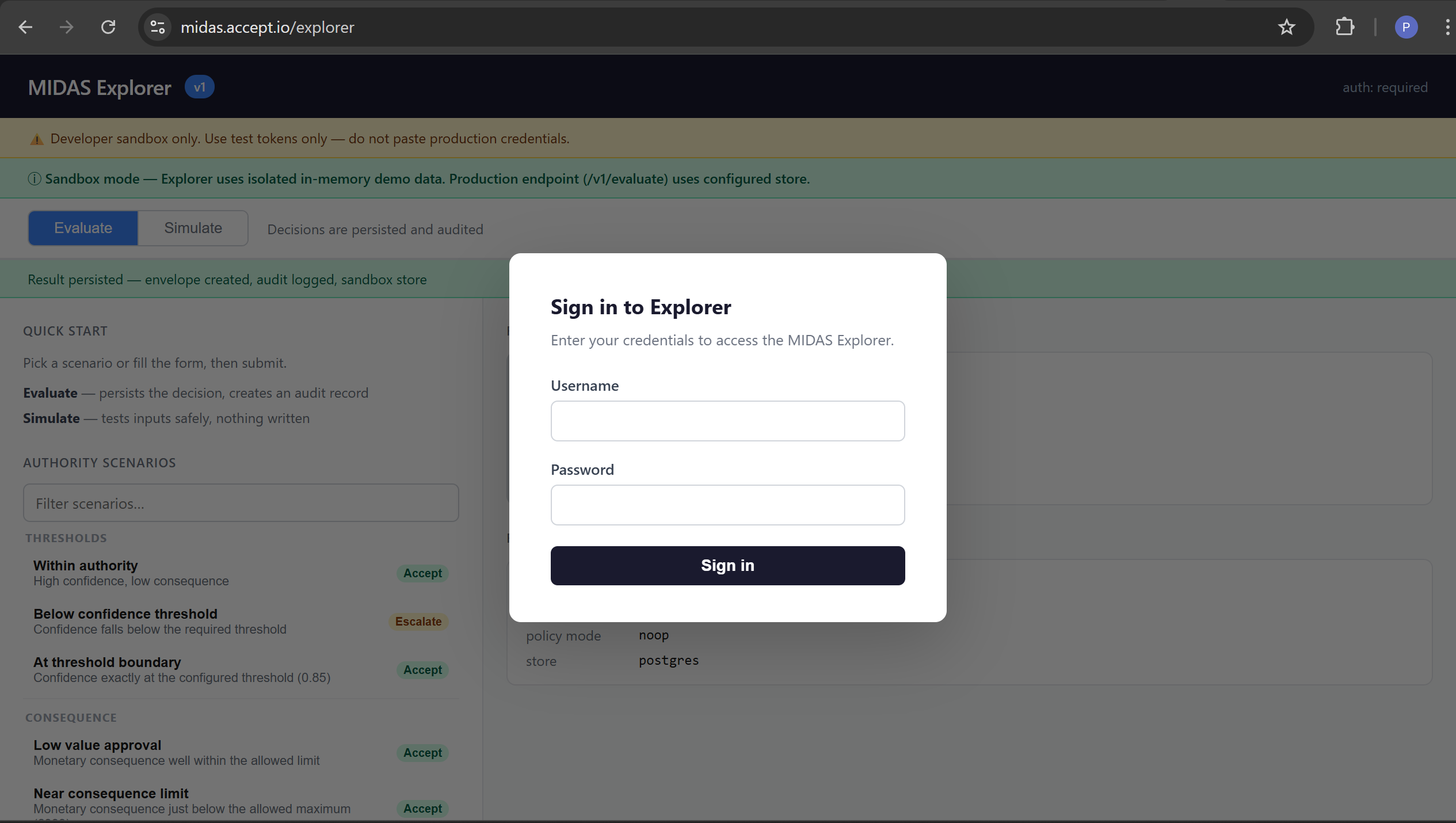
Access the Demo
Explorer URL: https://midas.accept.io/explorer
Login credentials:
Username: demo
The login overlay appears on load and blurs the Explorer interface until you sign in. Enter the credentials above and click Sign in. If this is the first login to the demo instance, you may be prompted to set a new password before continuing — this is default MIDAS behaviour for the bootstrap admin account.
This is a sandbox environment running an isolated in-memory store. Evaluations produce real governance envelopes but are not persisted between server restarts. Do not submit production credentials or sensitive data.
Recommended Scenarios
Use the Authority Scenarios panel in the left sidebar to select a pre-built payload. Each scenario populates the request form automatically. Click Submit to evaluate.
Within authority
- Demonstrates: Successful autonomous authorisation
- Outcome: Accept
- Why: Confidence (0.95) meets the required threshold (≥ 0.85). Consequence (£100) is within the authority limit (≤ £1,000). The authority chain resolves: surface is active, agent holds a valid grant, profile thresholds are satisfied.
Below confidence threshold
- Demonstrates: Confidence threshold enforcement
- Outcome: Escalate
- Why: Submitted confidence (0.30) is below the minimum required by the authority profile (0.85). MIDAS does not reject the request — it routes it to human review. The agent may be correct; confidence is too low for autonomous execution.
Above consequence limit
- Demonstrates: Consequence limit enforcement
- Outcome: Escalate
- Why: The submitted consequence (£2,500) exceeds the authority limit (£1,000). Regardless of confidence, decisions of this magnitude require human authorisation under the configured profile.
Missing required context
- Demonstrates: Context validation
- Outcome: Request Clarification
- Why: The
surf-context-validationsurface uses a profile that requirescustomer_idto be present in the request context. No context was submitted. MIDAS cannot proceed without the required fields and requests clarification rather than escalating or rejecting.
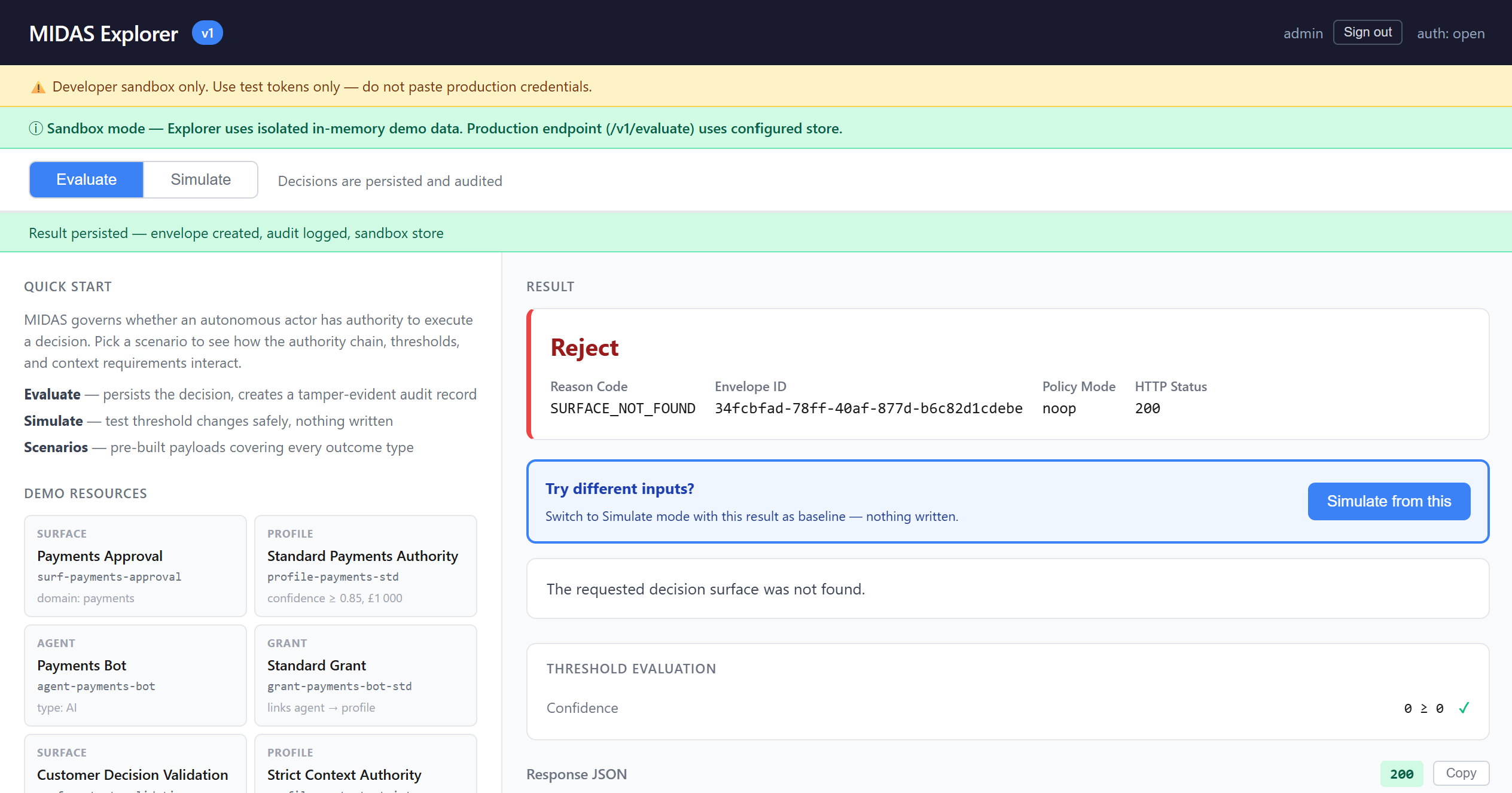
Unknown surface
- Demonstrates: Authority chain validation
- Outcome: Reject
- Why: No decision surface with the submitted ID exists in the store. MIDAS cannot establish an authority chain — there is no profile to evaluate against. Authority chain failures are hard rejections, not escalation candidates.
What to Look for in the Explorer
Outcome card — the primary result displayed in large text: Accept, Escalate, Reject, or Request Clarification. Colour-coded green, amber, red, and purple respectively. The card also shows the reason code, envelope ID, and HTTP status.
Explanation box — a plain-English sentence describing the outcome, written using the actual values from the evaluation. For example: "Confidence 0.30 is below the required threshold of 0.85. Human review is required before this decision can execute."
Threshold Evaluation panel — the numeric breakdown showing what was compared. Appears after Evaluate mode calls (requires a governance envelope). Shows confidence provided vs required threshold, consequence provided vs limit, and the outcome driver — which factor was determinative. Each comparison has a pass or fail indicator.
Authority Chain panel — the resolved path that produced the outcome, displayed as a flow: Surface → Profile → Grant → Agent, with version numbers for surfaces and profiles. This tells you exactly which authority was in effect at evaluation time.
Decision Record — click "View decision record" after a successful evaluation to load the full governance envelope. Shows a summary (lifecycle state, outcome, reason code, evaluation timestamp) and the complete envelope JSON. The envelope is the tamper-evident audit record produced for every governed decision.
Using MIDAS via the CLI
The Explorer uses the same HTTP API that production integrations use. You can call it directly from the command line to integrate MIDAS into scripts, CI pipelines, or test harnesses.
Note: The demo uses session-cookie authentication (local IAM). The curl examples below use a two-step flow: first establish a session, then submit evaluation requests using the session cookie. The cookie name is midas_session.
Step 1 — Authenticate
curl -c /tmp/midas-demo-cookie \
-X POST https://midas.accept.io/auth/login \
-H "Content-Type: application/json" \
-d '{"username": "admin", "password": "admin"}'
On success, the session cookie is saved to /tmp/midas-demo-cookie and the response confirms your roles:
{
"username": "admin",
"roles": ["platform.admin"],
"must_change_password": false
}
Use -c /tmp/midas-demo-cookie to save the cookie and -b /tmp/midas-demo-cookie to send it on subsequent requests.
Example 1 — Within authority (Accept)
curl -b /tmp/midas-demo-cookie \ -X POST https://midas.accept.io/explorer \
-H "Content-Type: application/json" \
-d '{
"surface_id": "surf-payments-approval",
"agent_id": "agent-payments-bot",
"confidence": 0.95,
"consequence": { "type": "monetary", "amount": 100, "currency": "GBP" }
}'
Expected response:
{
"outcome": "accept",
"reason": "WITHIN_AUTHORITY",
"envelope_id": "a1b2c3d4-e5f6-7890-abcd-ef1234567890",
"explanation": "The request is within the agent's granted authority. Confidence and consequence are both within profile thresholds.",
"policy_mode": "noop"
}
The envelope_id identifies the governance record created for this evaluation. Use it to retrieve the full envelope from GET /explorer/envelopes/{id}.
Example 2 — Below confidence threshold (Escalate)
curl -b /tmp/midas-demo-cookie \
-X POST https://midas.accept.io/explorer \
-H "Content-Type: application/json" \
-d '{
"surface_id": "surf-payments-approval",
"agent_id": "agent-payments-bot",
"confidence": 0.30,
"consequence": { "type": "monetary", "amount": 100, "currency": "GBP" }
}'
Expected response:
{
"outcome": "escalate",
"reason": "CONFIDENCE_BELOW_THRESHOLD",
"envelope_id": "b2c3d4e5-...",
"explanation": "Confidence 0.30 is below the required threshold of 0.85. Human review is required before this decision can execute.",
"policy_mode": "noop"
}
Example 3 — Missing required context (Request Clarification)
curl -b /tmp/midas-demo-cookie \
-X POST https://midas.accept.io/explorer \
-H "Content-Type: application/json" \
-d '{
"surface_id": "surf-context-validation",
"agent_id": "agent-payments-bot",
"confidence": 0.95,
"consequence": { "type": "monetary", "amount": 100, "currency": "GBP" }
}'
Expected response:
{
"outcome": "request_clarification",
"reason": "INSUFFICIENT_CONTEXT",
"explanation": "The authority profile requires additional context keys that were not provided in the request.",
"policy_mode": "noop"
}
Note: no envelope_id is returned for request_clarification outcomes — the evaluation did not reach the point of creating a governance envelope.
Resend the request with the required context to proceed:
curl -b /tmp/midas-demo-cookie \
-X POST https://midas.accept.io/explorer \
-H "Content-Type: application/json" \
-d '{
"surface_id": "surf-context-validation",
"agent_id": "agent-payments-bot",
"confidence": 0.95,
"consequence": { "type": "monetary", "amount": 100, "currency": "GBP" },
"context": { "customer_id": "cust-12345" }
}'
Request Structure
Every MIDAS evaluation request uses the same structure, whether submitted via the Explorer UI, the sandbox endpoint, or the production API.
{
"surface_id": "surf-payments-approval",
"agent_id": "agent-payments-bot",
"confidence": 0.95,
"consequence": {
"type": "monetary",
"amount": 100,
"currency": "GBP"
},
"context": {
"customer_id": "cust-12345",
"channel": "api"
}
}
FieldRequiredDescriptionsurface_idYesThe decision surface being requested. Determines which authority profile applies.agent_idYesThe autonomous actor submitting the request. Must be registered and hold an active grant for the surface.confidenceYesThe agent's self-reported certainty score (0.0 to 1.0). Compared against the profile's confidence threshold.consequenceNoThe estimated impact of the decision. type is required if consequence is provided. Supported types: monetary, risk_rating.contextNoArbitrary key-value pairs passed through to the envelope. Required if the authority profile declares required_context_keys.
The consequence.type field is required when submitting a consequence. The demo profile uses type monetary with amount and currency fields.
Authority Model Overview
MIDAS governs decisions through a layered authority model. The conceptual structure is:
# Conceptual authority model — see Getting Started guide for full configuration reference
surface:
id: surf-payments-approval
domain: payments
# Defines the governance boundary for this class of decision
profile:
id: profile-payments-std
surface_id: surf-payments-approval
confidence_threshold: 0.85
consequence_limit:
type: monetary
amount: 1000
currency: GBP
# Defines the thresholds an agent must satisfy for autonomous execution
agent:
id: agent-payments-bot
type: AI
# The autonomous system requesting authorization
grant:
id: grant-payments-bot-std
agent_id: agent-payments-bot
profile_id: profile-payments-std
# The explicit authorization linking agent to profile
An evaluation can only succeed if a complete authority chain exists: the surface is active, the agent is registered, an active grant links the agent to a profile on that surface, and the profile's thresholds are satisfied by the request.
For full configuration reference, see the Getting Started guide.
Roles in Production
The demo uses a single admin/admin account for simplicity. In a production MIDAS deployment, responsibilities are typically separated across three roles:
Agent — the autonomous system calling POST /v1/evaluate. The agent submits requests for governance evaluation; it does not configure surfaces or grants. In production, the agent uses a machine credential (bearer token) rather than an admin account.
Reviewer — a human user who handles escalated decisions. When MIDAS returns escalate, the decision is queued for a reviewer to approve or override via POST /v1/reviews. The Explorer does not implement the review workflow — see the API specification for details.
Admin / Operator — configures the authority model: registers agents, creates surfaces and profiles, and manages grants. Uses the control plane API (POST /v1/controlplane/apply) to publish authority bundles. The platform.admin and platform.operator roles cover these responsibilities.
These are production concepts, not separate login accounts in the demo.
Further Reading
Explorer Guide — Full UI walkthrough, scenario reference, and troubleshootinghttps://github.com/accept-io/midas/blob/main/docs/explorer.md
Getting Started — Installation, configuration, and deployment guidehttps://github.com/accept-io/midas/blob/main/docs/getting-started.md
GitHub Repository — Source code, OpenAPI specification, and contribution guidehttps://github.com/accept-io/midas
Troubleshooting
"401 Unauthorized" — Your session has expired. Re-authenticate at https://midas.accept.io/explorer or rerun the login curl command to refresh your session cookie.
"surface_id and agent_id are required" — These fields are mandatory. Use the surface IDs and agent IDs from the demo resources panel: surf-payments-approval, surf-context-validation, agent-payments-bot.
request_clarification when you expect accept — You are submitting against surf-context-validation without a customer_id in the context field. Add "context": {"customer_id": "your-value"} to the request.
Curl command receives a redirect or HTML response — The session cookie was not sent or has expired. Re-run the login step and ensure you are using -b /tmp/midas-demo-cookie on all subsequent requests.
Open the Explorer at https://midas.accept.io/explorer, sign in, and select a scenario from the left panel. Each scenario runs in under a second and produces a full governance record you can inspect. The Explorer Guide covers every panel and scenario in detail, and the Getting Started guide covers running your own MIDAS instance.

A guided walkthrough of the MIDAS Explorer — try authority evaluation, threshold enforcement, and context validation against a live instance.
Stay up to date with Accept Labs
Insights, experiments, and new capabilities from Accept Labs — delivered as they emerge.