

MIDAS Explorer: Understanding and Governing Autonomous Decisions
A practical guide to using the MIDAS Explorer to evaluate, explain, and govern autonomous decisions — with real scenarios, authority chains, and explainable outcomes.
Introduction
The MIDAS Explorer is a browser-based interface that lets you interact with the MIDAS governance engine in real time.
It is designed for:
- developers integrating AI or autonomous systems
- architects evaluating governance approaches
- reviewers assessing how decisions are controlled and audited
Unlike a typical API console, the Explorer is not just about sending requests — it is about understanding:
- why a decision was allowed
- how authority was resolved
- what governance record was produced
What MIDAS Actually Does
At runtime, MIDAS answers a single question:
Does this actor have the authority to execute this decision right now?
This is fundamentally different from other systems:
- Rules engines decide what should happen
- Policy engines decide what is allowed
- MIDAS decides whether execution is authorised
It sits downstream of decision logic, governing whether an action can proceed.
Getting Started
Run MIDAS locally and open:
http://localhost:8080/explorer
When the Explorer loads:
- A demo scenario runs automatically
- You immediately see a governed outcome
- The interface shows how MIDAS reached that decision
If authentication is enabled:
- A login overlay appears
- The Explorer is blurred and non-interactive until login
- Once authenticated, the full interface is available
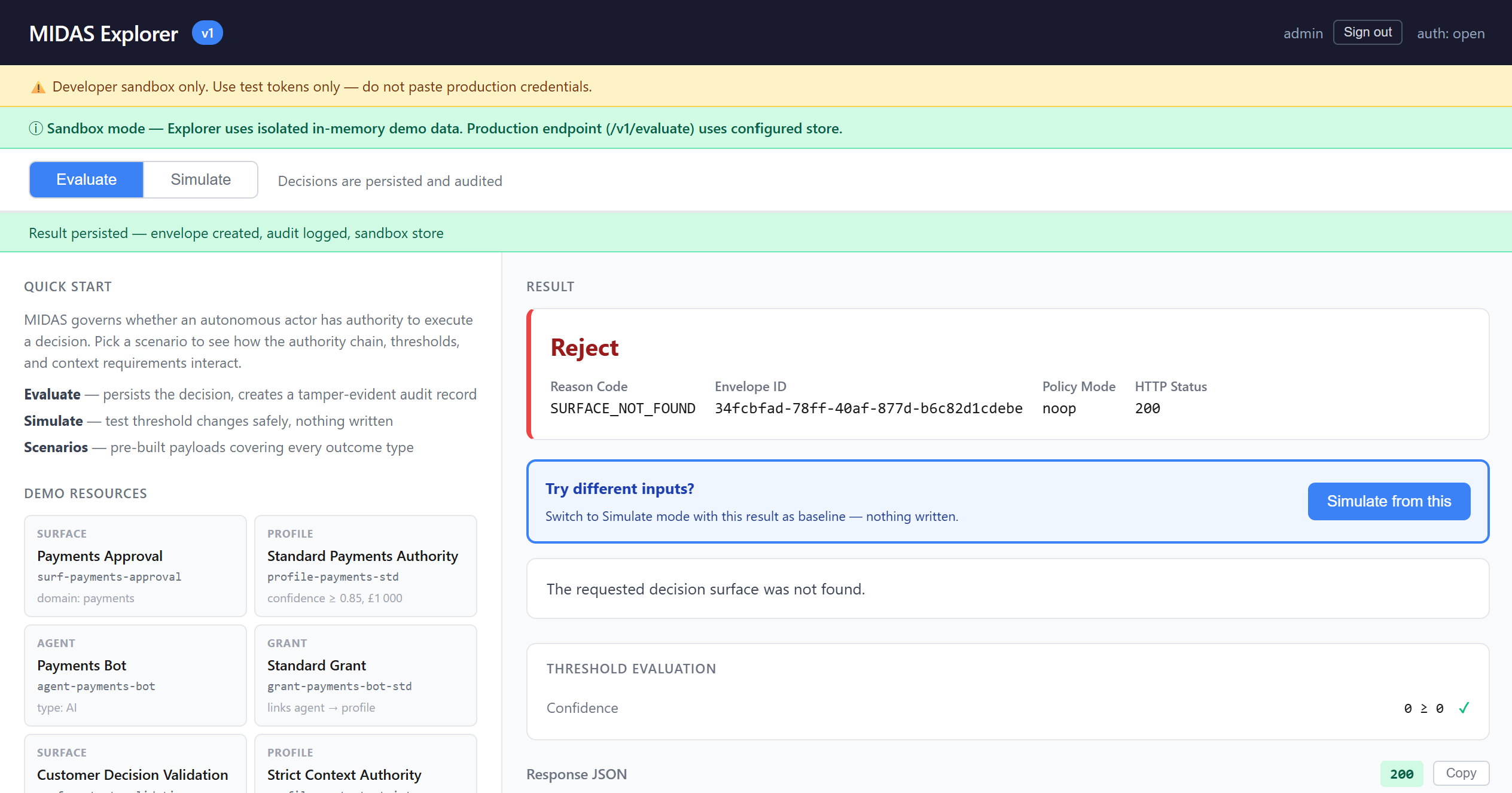
Explorer Layout
Left Panel — Build and Understand Requests
- Scenarios: pre-built governance examples
- Request Builder: form or JSON
- Resource Panel: the authority model behind the scenes
Right Panel — Inspect Decisions
- Outcome
- Explanation
- Threshold evaluation
- Authority chain
- Raw response
- curl commands
- Decision record (envelope)
Try This First: Scenarios
The fastest way to understand MIDAS is through scenarios.
Threshold Example — Below Confidence
- Confidence: 0.30
- Required: ≥ 0.85
Result: Escalate
Why? The agent is not confident enough — so MIDAS routes to human review.
Consequence Example — High Impact
- Amount: £2,500
- Limit: £1,000
Result: Escalate
Even with high confidence, the impact is too large for autonomous execution.
Context Example — Missing Required Data
Result: Request Clarification
MIDAS does not guess — it requires complete context before evaluating authority.
Evaluate vs Simulate
This is one of the most important concepts.
Evaluate
- Creates a governance record (envelope)
- Writes audit data
- Represents real execution
Simulate
- No persistence
- No audit
- Safe experimentation
You can take a real decision and click “Simulate from this” to test variations.
Understanding a Decision
Outcome
MIDAS produces four outcomes:
- Accept
- Escalate
- Reject
- Request Clarification
Explanation Panel
This is where MIDAS becomes powerful.
You see:
- confidence vs threshold
- consequence vs limit
- which factor drove the decision
Example:
Confidence: 0.30 ≥ 0.85 ✗ Consequence: £100 ≤ £1,000 ✓ Outcome driver: confidence threshold
Authority Chain
Every decision resolves a chain:
Surface → Profile → Grant → Agent
This shows:
- what decision boundary was used
- what rules applied
- who was authorised
- why execution was permitted or denied
Governance Envelope (Decision Record)
Every evaluated decision produces a governance envelope.
The envelope includes:
- outcome
- reason
- authority chain
- evaluation data
- timestamp
This is your audit trail.
MIDAS makes decisions explainable and traceable by design
The Authority Model (Why Decisions Behave This Way)
The resource panel shows the model behind everything:
- Surface → what type of decision
- Profile → thresholds and rules
- Agent → who is acting
- Grant → who is allowed to act
These directly drive the scenarios you run.
Example Walkthrough
Low Confidence Decision
Input
{
"confidence": 0.30,
"amount": 100
}
Evaluation
- Confidence below threshold
- Consequence acceptable
Outcome
→ Escalate
Why
The agent is uncertain — a human must decide.
Troubleshooting
401 Unauthorized
→ Token missing or expired
→ Re-authenticate
Invalid JSON
→ Syntax error
→ Use form mode
INSUFFICIENT_CONTEXT
→ Required fields missing
→ Add context
SURFACE_NOT_FOUND
→ Invalid surface ID
→ Use demo scenarios
Key Takeaways
- MIDAS governs execution authority, not decision logic
- Authority chains are explicit and inspectable
- Decisions are explainable through threshold evaluation
- Outcomes are captured as governance records
- MIDAS fits naturally into cloud-native control planes
Closing
The MIDAS Explorer is not just a testing tool — it is a window into governed autonomy.
It shows how decisions can be:
- controlled
- explained
- audited
- trusted

Learn how MIDAS governs execution authority for AI systems through explainable decisions, threshold evaluation, and audit-ready governance records.
Stay up to date with Accept Labs
Insights, experiments, and new capabilities from Accept Labs — delivered as they emerge.